Visual MCP workspace for coordinating parallel AI coding agents
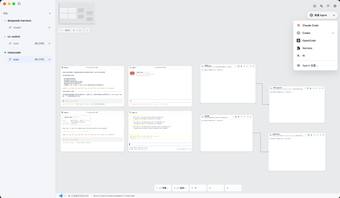
cleancode, developed by Chen, is an MCP server and visual workspace that coordinates CLI-based AI coding agents for code-cleaning and refactoring tasks. The tool places agents such as Claude Code and Codex onto an executable canvas, exposing embedded terminals, session discovery, and isolated test branches. It targets software engineers who use agentic assistants and offers a protocol-first environment that connects models to local development context and testable code branches.
What tasks can you actually use the tool for?
The tool acts as a visual coordination layer that brings CLI agents together on a canvas so they can operate on codebases in parallel. It is built as a Model Context Protocol server and is designed to give models programmatic access to development services, enabling high-level code cleaning, architectural edits, and multi-agent refactoring workflows without forcing everything into a single terminal session.
How reliable are the AI-driven code changes?
Reliability is tied to how generated edits are tested: the tool supports isolated Git worktrees so generated patches can be built and validated in separate branches before touching the primary repository. That design preserves repository integrity during experimentation. The quality of resulting changes therefore depends on the chosen CLI agents and the developer’s test coverage that runs against those temporary worktrees.
What file formats and environment does it require?
Installation and runtime assume a developer environment that supports the MCP and Node.js. The server is implemented in TypeScript and is typically installed via npm or npx, and it bridges to MCP hosts such as Claude Desktop. The visual interface runs in desktop environments and the tool expects CLI-capable agents that can be invoked from embedded terminals.
Does it fit into an existing developer workflow?
The tool integrates several workflow touchpoints: embedded PTY terminals for direct CLI interaction, session discovery to resume active work, and parallel agent execution to distribute tasks. Typical integration patterns include:
- Using worktrees for experimental branches and local testing
- Controlling CLI agents from the canvas while observing terminal output
- Resuming agent sessions discovered natively by the server
A community-driven option that suits teams prepared for active development
The project is maintained by an independent open-source developer who is active on GitHub, and the tool has gained traction within its niche on developer forums and repositories. That combination indicates an active project lifecycle and community interest rather than a static utility, making the tool appropriate for teams comfortable with iterative updates and community-contributed integrations.